Climb_and_Dive v1.5.3
Bluetooth App Installation
The preferred Bluetooth app is called Bluefruit Connect published by Adafruit industries and is available as a free download from both Android Google Play or from the Apple App Store. Adafruit publishes this app as a generic Bluetooth, or BLE (Bluetooth Low Energy), development tool for programmers and hobbyists to experiment with the various Bluetooth enabled development boards that they offer.
Update: April, 2026 - Attention iPhone users: Once you become familiar with the Bluefruit Connect app, I found a suggested alternative app called BLESerial nRF that you may like to try. Sorry, it’s not available for Android users.
The Bluefruit Connect app is capable of several different tasks. Communication with the Climb_and_Dive timer only requires the use of the UART Service. UART is a standardized communications protocol used to transfer data between different devices. Pairing is not required.
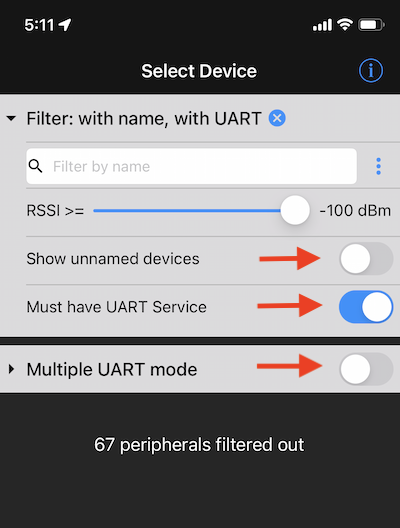
Download and install the Bluefruit Connect app. Open the app and set it up as shown below.
- Show unnamed devices OFF
- Must have UART Service ON
- Multiple UART mode OFF
Using the app with the timer is covered in the programming section of the operating instructions. If you have a questions or would like to learn more about the app, Adafruit has detailed tutorial here.